Migrating Data Attributes
You can include data attributes for migration as part of a load.
In the current release, EDC Migrator supports the following attributes:
- ILB (Intentionally Left Blank)
- SDV (Source Data Verification)
- DMR (Data Management Review)
- FREEZE
- LOCK
- ESIGNATURE
Identifying Target Objects
In the “attributes.csv” file, you identify a target object and enter “true” to apply an attribute to it. To apply multiple attributes to a target object, enter “true” for each attribute.
You can apply attributes to all of an object’s children by applying the attribute to the parent object. For example, if you identify a Form for SDV, migration applies SDV to all Items on that Form.
To uniquely identify an object, you must provide values in the following identifier columns:
- Casebook:
- STUDYID
- SUBJID
- SITENUM
- Event Group:
- STUDYID
- SUBJID
- SITENUM
- EGROUP
- EGROUPSEQ
- Event:
- STUDYID
- SUBJID
- SITENUM
- EGROUP
- EGROUPSEQ
- EVENT
- Event Date:
- STUDYID
- SUBJID
- SITENUM
- EGROUP
- EGROUPSEQ
- EVENT
- FIELD
- Visit Method:
- STUDYID
- SUBJID
- SITENUM
- EGROUP
- EGROUPSEQ
- EVENT
- FIELD
- Form:
- STUDYID
- SUBJID
- SITENUM
- EGROUP
- EGROUPSEQ
- EVENT
- FORM
- FORMSEQ
- Item Group:
- STUDYID
- SUBJID
- SITENUM
- EGROUP
- EGROUPSEQ
- EVENT
- FORM
- FORMSEQ
- ITEMGROUP
- IGSEQ
- Item:
- STUDYID
- SUBJID
- SITENUM
- EGROUP
- EGROUPSEQ
- EVENT
- FORM
- FORMSEQ
- ITEMGROUP
- IGSEQ
- ITEM
Configurable Identity
If you need to uniquely identify the records in your CSV using other columns, you can use a configurable identity.
The configurable identity feature allows you to locate and apply attributes (like FREEZE, LOCK, or SDV) to specific data objects using rules set up in your header YAML file. Configurable identities give each casebook, event, form, or item its own ID. These IDs are written using vertical bars (pipes), such as CB|5CASEBOOK for a casebook or I|4|Demographics_2ITEM for an item group.
Applying Attributes
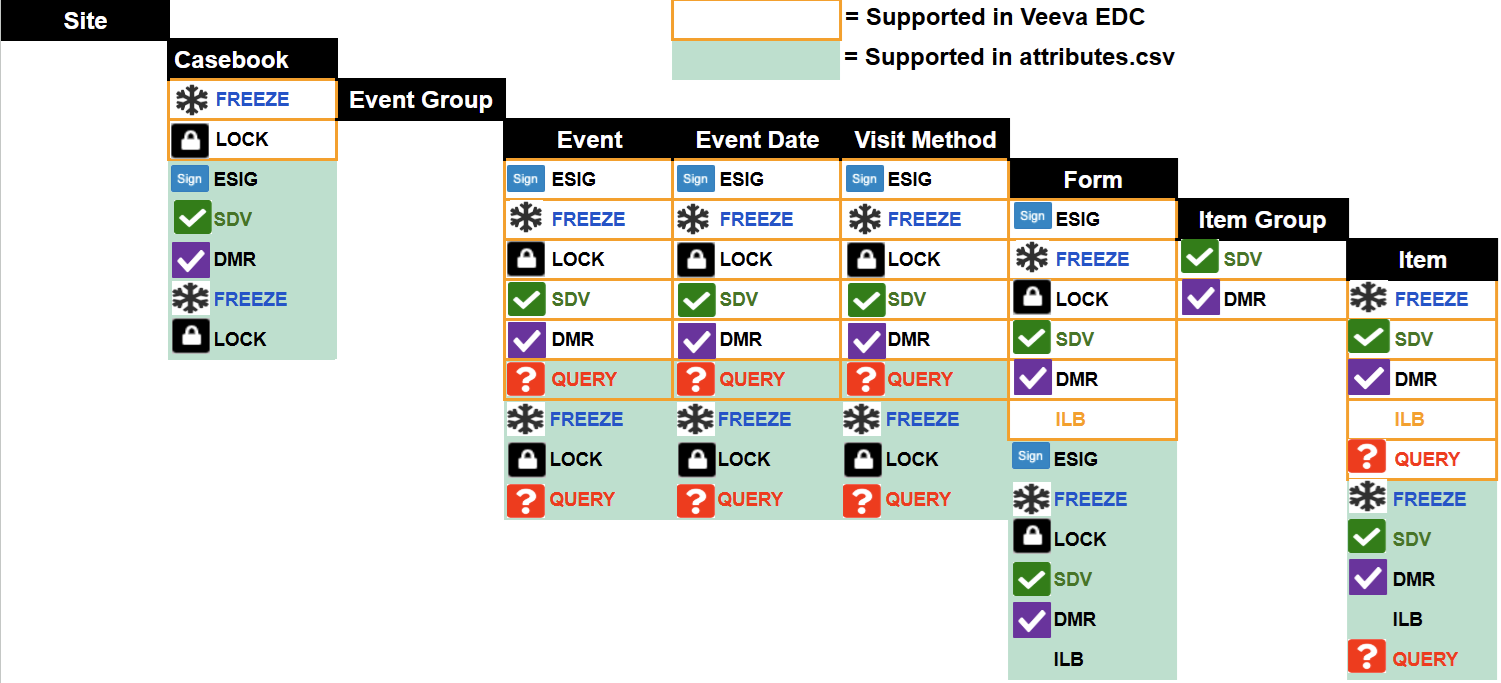
The Migrator applies attributes at the highest level and propagates them downward. For example, freezing a Form freezes all of its Items, and applying a Casebook signature signs every Form.
The following diagram illustrates the attribute application hierarchy, showing the structural levels that support attribute ingestion.
Intentionally Left Blank
You can mark a Form or individual Items as Intentionally Left Blank (ILB).
Source Data Verification (SDV)
You can mark Event Dates and Items as SDV (the SDV Complete status in EDC). To apply the SDV status in bulk, set the attribute at a higher structural level:
- Set the attribute at the Casebook level to apply it to all Forms and their Items
- Set the attribute at the the Form level to apply it to all Items on the Form
DMR
You can perform data management review (DMR) after a form is submitted to ensure that data collection follows study protocols. DMR attributes are applied in the Attributes CSV File at the Casebook, Form, and Item levels. For more information, read DMR Support for Migration.
Frozen
You can freeze a Casebook (subject), an Event (freezing the Event Date and all Forms within the Event), an Event Date, a Visit Method, a Form (and all of its Items), and individual Items.
Locked
You can lock a Casebook (subject), an Event (lock the Event Date and all Forms within the Event), an Event Date, a Visit Method, a Form (and all of its Items), and individual Items.
eSignature
You can sign a Casebook (subject), which signs all of the casebook’s Forms that are in the Submitted status, or sign individual Forms. Forms must be in the Submitted status for signatures to apply.
Preparing the Attributes CSV File
You use a CSV file (“attributes.csv”) to map your attributes to their target objects in your source data.
Use this template to create your CSV file:
Download the Attributes Template
Your CSV file must include the following columns, with the exact header values specified in the table:
| Column | Description |
|---|---|
| STUDYID | Enter the Study ID for the Study. This must match the value used in other extracts. |
| SUBJID | Enter the Subject ID ( |
| SITENUM | Enter the Site Number ( |
| EGROUP | Enter the Name of the Event Group Definition. |
| EGROUPSEQ | For repeating Event Groups, enter the Sequence Number of the Event Group. |
| EVENT | Enter the Name of the Event Definition. |
| FORM | Enter the Name of the Form Definition. |
| FSEQ | For repeating Forms, enter the Sequence Number of the Form. |
| IGSEQ | For repeating Item Groups, enter the Sequence Number of the Item Group. |
| ITEM | Enter the Name of the Item Definition. |
| ITEM_VALUE | Enter the value of the item identified in the ITEM column. |
| REFERENCE | Enter the identity reference string separated by vertical bars (pipes). Provide this when using the Configurable Identity feature, otherwise leave this column blank. |
| REFERENCE_TYPE | Enter the value in all caps. Provide this when using a REFERENCE with the Configurable Identity feature. The following types are supported: Acceptable values for the Attributes CSV file:
|
| FIELD | Apply an attribute to an Event Date or the Visit Method, but not to both. Otherwise, leave this column blank. Enter one of the following:
|
| ILB | Enter “true” to mark the target object as Intentionally Left Blank. Otherwise, leave this column blank. |
| ILB_REASON | If you enter “true” in the ILB column, enter a Reason. This must be an exact match to a reason configured in EDC. If blank, it defaults to Set by Migration. |
| DMR | Enter “true” to mark the target object as DMR Complete. Otherwise, leave this column blank. This is valid for casebook, form, and item levels. |
| SDV | Enter “true” to mark the target object as SDV Complete. Otherwise, leave this column blank. This is valid for casebook, form, and item levels. |
| FREEZE | Enter “true” to mark the target object as Frozen. Otherwise, leave this column blank. The Migrator automatically propagates this information down to child records. |
| LOCK | Enter “true” to mark the target object as Locked. Otherwise, leave this column blank. The Migrator automatically propagates this information down to child records. |
| ESIG | Enter “true” to mark the target object as Signed. This is valid for subject and form levels. The Migrator automatically marks forms as Submitted. Otherwise, leave this column blank. |