Veeva Migration Reports
EDC Migrator offers a collection of reports you can use to monitor the state of migrated objects after you load your Study into the staging database or to help troubleshoot a failed load.
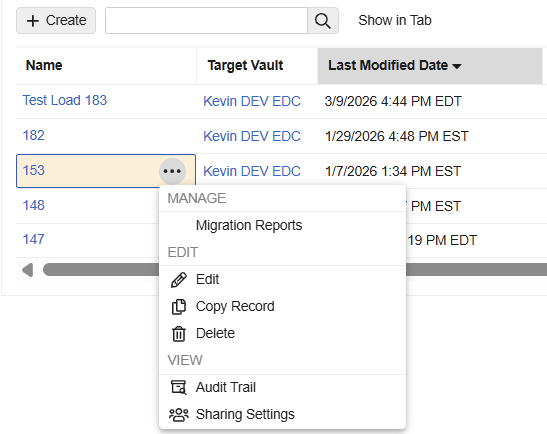
You can initiate report creation from the Load section’s Actions menu within the EDC Migrator.
Prerequisites
Users with the Migrator, System Administrator, and Vault Owner security profiles can perform the actions described below by default. If your vault uses user-defined Security Profiles, your profile must grant the following permissions:
| Permission | Controls |
|---|---|
| Tabs: Projects | Ability to access the Projects tab |
What’s Included
Veeva Migration Reports include the following reports:
- Completion_Times: Provides a time log of each migration step.
- Task_Type_Status_Count: Displays counts of each task by status. It displays the results from the Run Summary page and includes the following statuses:
- Created
- Ready
- Claimed
- Success
- Failure
- Skipped
- Attributes: Lists the counts of locked and frozen Forms and Events.
- Use this report to compare against the Summary Records in EDC to help determine if the Reconcile Listings job was a success.
- Failed_Skipped_Task_Types: Lists tasks (for example, CREATE_EVENT_GROUP or SUBMIT_FORM) that fail or that the system skips, along with the reason.
- Orphaned_Task_Types: Lists tasks (for example, CREATE_FORM or CREATE_ITEM_GROUP) that don’t have a corresponding parent.
- Task_Types_With_Failed_Skipped_Parent: Lists tasks (for example, CREATE_ITEM GROUP or CREATE_ITEM) that the system does not process because their parent holds a Failed or Skipped status.
- Repaired_Objects: Lists objects that the repair process creates. It also lists repaired objects where the system does not apply attributes, along with a list of those specific attributes.
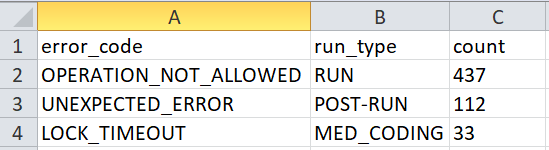
- Error Stats: Lists the types of errors and their count.
Vault delivers these reports as a single Excel™ file, with a separate worksheet for each report.
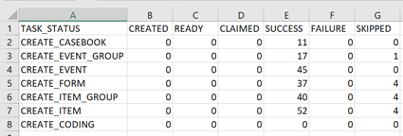
Task Types Report
Veeva Migration Reports provide a maximum of 10,000 errors for each task type (task_type). Task types are actions—such as creating event groups or submitting forms—executed during different stages of the migration process. Task statuses (task_status) track the progress of each action and identify where errors or skips occur.
The report bases the number of displayed records on the task type and status, and only the first 10,000 records for each task type and status combination appear in the report.
This protocol applies to the following reports:
Failed_Skipped_Task_TypesTask_Types_With_Failed_SkippedOrphaned_Task_Types
Reports may contain the following task types:
| Task Type | Description |
|---|---|
CREATE_EVENT_GROUP |
Creation of an Event Group. This action occurs during step 3, Run. |
CREATE_EVENT |
Creation of an Event. This action occurs during step 3, Run. |
CREATE_FORM |
Creation of a Form. This action occurs during step 3, Run. |
CREATE_ITEM |
Creation of an Item. This action occurs during step 3, Run. |
CREATE_EXECUTION_ATTRIBUTE |
Lock and Freeze. These actions occur during step 4, Post-Run. There is no distinction between Lock and Freeze in this context. Use this to validate that the Reconcile Listings job finishes successfully. |
CREATE_REVIEW_ATTRIBUTE |
SDV and DMR. This action occurs during step 4, Post-Run. There is no distinction between SDV and DMR in this context. |
CREATE_SIGNATURE_ATTRIBUTE |
Signing of a Form. This action occurs during step 4, Post-Run. |
CREATE_SUBJECT_SIGNATURE |
Signing of a Casebook. This action occurs during step 4, Post-Run. |
SUBMIT_FORM |
Submission of a Form. This action occurs during step 5, Form Submission. |
Reports may contain the following task statuses:
| Task Status | Description | Action |
|---|---|---|
SKIPPED |
The system skips the action described in the task_type due to the task_status_reason. |
Use the object_identity to identify the object that the system skips. |
CREATED |
The system creates the object. This status mostly identifies orphaned records, which are objects that exist but do not migrate because they lack a parent object. | Use the object_identity to determine the object that the system creates. |
SUCCESS |
The system successfully creates and migrates the object. This status mostly identifies objects that the repair process successfully creates. | You cannot submit a form if it contains an Item that the repair process creates or if the repair process creates the entire Form. The system cannot apply an attribute to an object that the repair process creates. Also, the system cannot apply an attribute to a Form if that Form contains an Item that the repair process creates. |
Completion Times Report
The Completion Times report is located in the first tab of the Veeva Migration Report. It provides details on the time it takes to complete each Migration step and the entire load.
The report includes the following data points:
- Step name and status
- Step length of completion time in hours and minutes
- Step start and end times
- Total completion time for the entire load (all Migration steps)
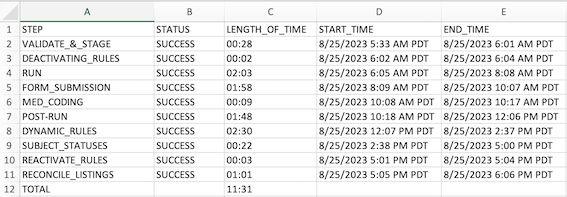
The Completion Times report is available after the initial Migration step. If a step fails and rules are reactivated, the Reactivate Rules step is displayed after the failed step. In this situation, only executed steps are displayed in the report.
For retried runs, each attempt is recorded with relevant start and end times. When a step is restarted, the times reflect the restarted step. For original step execution times, check the Audit Trail.
Learn more about Retrying Runs.
Attributes Report
After the Post-Run step completes, the Attributes report provides the counts of locked and frozen Forms and Events. You can compare these numbers to the numbers in the Form Progress Listings and Event Progress Listings reports. If the numbers match, your Reconcile Listings job was successful.
Learn more about Creating Study Listings.
Error Stats Report
The Error Stats report summarizes the health of a migration operation by listing the types and count of errors when they occur. Report data is available after the completion of each step. When no errors are present, the report is visible but empty. The Error Stats report contains three columns: error code, run type, and count.
How to Generate Reports
You can generate the reports from a Load, once the staging process is complete for the load.
To generate the Veeva Migration Reports file:
- Navigate to the Load that you want to report on.
-
From the load’s Actions () menu, select Migration Reports.
- In the confirmation dialog, click Continue.
- Vault begins a job to generate the report file. When finished, Vault sends an email notification with a link to download the report (“<Study_Name>Veeva_Migration_Reports<Generation_DateTime>.xlsx”).